
In the rapidly changing world of technology, one thing is becoming clear: the old web methods are now being replaced by new artificial intelligence (AI). But a closer look reveals a different reality. The real story is not about changing things, but about working together. The power of specific languages like HTML and systems like Python is now being further enhanced with new features of generative AI. Together, they are paving a new path for today’s web, where human understanding, machine speed and firm rules come together to shape the digital world of tomorrow.
The Unshakable Foundation: HTML in the Contemporary Tech Stack
At the heart of every digital object is an artificial structure that gives it shape and meaning. Hypertext Markup Language (HTML) remains the essential foundation that provides the right framework for all content on the web. From a simple blog to the fastest running dashboard, the entire basic structure is made up of HTML elements that make up titles, paragraphs, links, images, and forms.
<!DOCTYPE html>
<html lang="en">
<head>
    <meta charset="UTF-8">
    <meta name="viewport" content="width=device-width, initial-scale=1.0">
    <title>Modern Web Architecture</title>
    <link rel="stylesheet" href="styles.css">
</head>
<body>
    <header>
        <nav>
            <ul>
                <li><a href="#home">Home</a></li>
                <li><a href="#about">About</a></li>
                <li><a href="#services">Services</a></li>
            </ul>
        </nav>
    </header>
    <main>
        <article>
            <h1>The Future of Web Development</h1>
            <p>HTML provides the essential structure for all web content.</p>
        </article>
    </main>
</body>
</html>Changes to HTML5 have given the web specific tags such as <article>, <section>, and <nav>, creating a simpler and easier to understand framework for both browsers and assistive technologies. This basic foundation, which is given color and design by CSS (Cascading Style Sheets) and movement by JavaScript, forms the three main components for doing the front-end of the web.
Frontend Technology Stack Relationship:
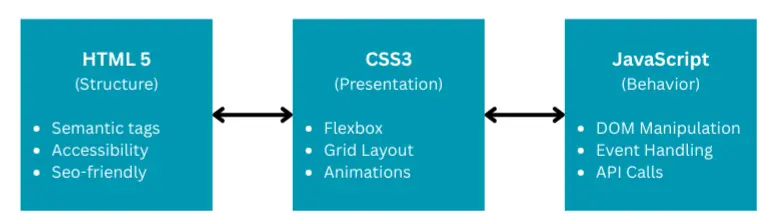
All their work is very concrete; they are the language of the entire world of the web visible to the public, which is proved by the digital presence of the world’s largest organizations. For example, independent developers have copied well the layout of NASA’s original website using only HTML and CSS, which shows that these techniques are capable of providing better and people-friendly interfaces.
The Generative AI Co-Pilot: Augmenting Development, Not Replacing Developers
The advent of OpenAI’s Large Language Models (LLMs) like ChatGPT has brought a huge change in this built world. These models, learned from a lot of text and code data, have a remarkable ability to create human-like text and, in particular, working snippets. As a result, they have established themselves as powerful co-pilots in software development.
AI-Assisted Development Workflow:
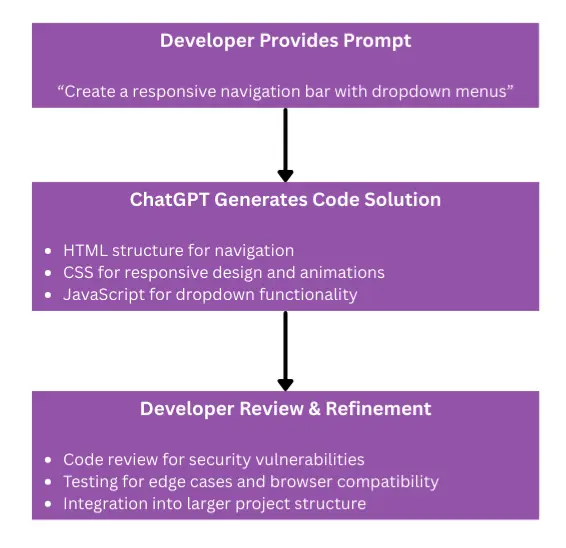
ChatGPT shows good expertise in converting common language prompts into code in many languages, including key web technologies such as HTML, CSS, and JavaScript. Here’s how it works:
- Creating basic code: Automating frequently used code structures, such as navigation bars or HTML page structures.
- Finding and Correcting Errors: Identifying code writing errors and explaining ways to make old code better, which makes the code easier to read.
- Creating Documents: Creating important but difficult documents, such as README files, allows developers time for more complex tasks.
Example AI-Generated Responsive Navigation:
<!-- AI-Generated HTML Structure -->
<nav class="navbar">
    <div class="nav-container">
        <div class="nav-logo">Site Name</div>
        <ul class="nav-menu">
            <li class="nav-item"><a href="#" class="nav-link">Home</a></li>
            <li class="nav-item"><a href="#" class="nav-link">About</a></li>
            <li class="nav-item"><a href="#" class="nav-link">Services</a></li>
        </ul>
        <div class="hamburger">
            <span class="bar"></span>
            <span class="bar"></span>
            <span class="bar"></span>
        </div>
    </div>
</nav>/* AI-Generated CSS for Responsive Design */
.navbar {
background-color: #1a1a1a;
padding: 0 2rem;
box-shadow: 0 2px 4px rgba(0,0,0,0.1);
}
.nav-container {
display: flex;
justify-content: space-between;
align-items: center;
max-width: 1200px;
margin: 0 auto;
}
.nav-menu {
display: flex;
gap: 2rem;
list-style: none;
}
@media screen and (max-width: 768px) {
.nav-menu {
position: fixed;
left: -100%;
top: 5rem;
flex-direction: column;
background-color: #1a1a1a;
width: 100%;
text-align: center;
transition: 0.3s;
}
.nav-menu.active {
left: 0;
}
}This way of working together creates a rapid information cycle. A developer can point out a problem, get a solution, find an error, and request improvements, making the task of creating the first design much faster and reducing the burden on the brain. It also greatly reduces the difficulty of starting work for new programmers, as they can get help in the form of instant, conversational help.
In this new way, however, one thing must be remembered: Attention to human beings is vital. LLMs (models) work not by actual thinking (logic), but by predicting the next word or code according to the data. This leads to the shortcomings that everyone knows about:
ChatGPT Code Generation: Capabilities vs Limitations
| Aspect | Strengths | Weakness |
| Code Quality | 90.2% pass rate on HumanEval benchmark; produces modular, clean code | Often less efficient in runtime/memory usage than human code |
| Error Handling | Implements robust exception handling; provides debugging outputs | Fails on edge cases (empty arrays, unexpected inputs) |
| Security | Can follow security best practices when explicitly prompted | May introduce SQL injection, hardcoded secrets from training data |
| Reliability | Excels at common algorithms and data analysis tasks (93.1% accuracy) | Hallucinates non-existent functions and APIs; outdated methods |
| Reasoning | Good for well-defined, standard problems | Lacks true understanding; misinterpret implicit requirements |
So, the best use of generative AI is the “human-in-the-loop” approach where the developer becomes a pathfinder and checker to thoroughly test and evaluate all the AI generated code. AI is a powerful thing that speeds up work, it is not an engineer working on its own.
NASA’s Dual-Tech Reality: A Case Study in Modern Web Architecture
The rigorous technical framework of the National Aerospace and Space Administration (NASA) is a good example of a well-functioning new web framework. This explains the clear division of front-end and back-end tasks.
NASA’s Multi-Layered Digital Architecture:
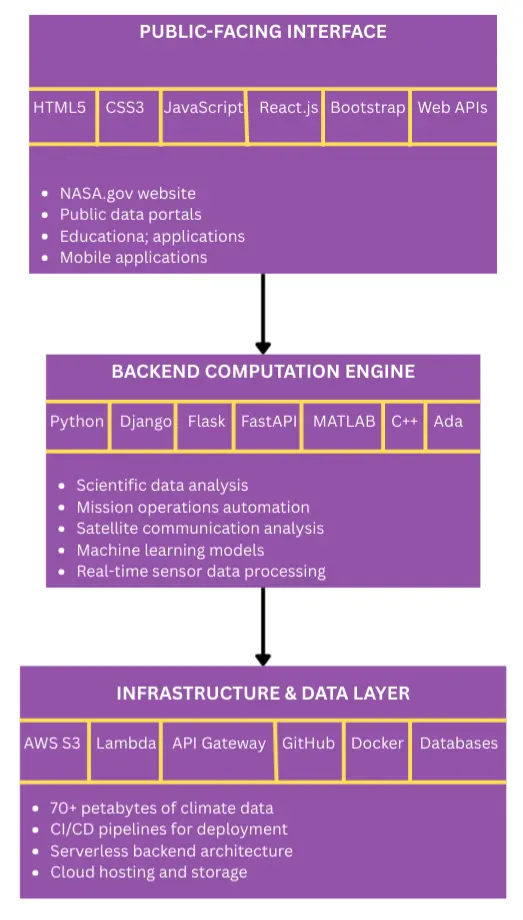
While people see NASA’s work through websites built on the three main techniques of HTML, CSS, and JavaScript, the real and hard-to-calculate work takes place inside, which is mainly run by Python. Python has emerged as a “tool for every task” for this agency, which performs a number of functions:
- Understanding scientific data: Conserve the vast amounts of data from telescopes and satellites using libraries such as NumPy, SciPy, and Pandas.
- Mission Execution and Automation: Writing code for difficult work methods such as planning in advance for the Space Shuttle program.
- Building and testing models: Understanding the motion of planets and detecting any errors in the data coming from the spaceship.
Example: Python Code for Satellite Data Analysis
# NASA-style data analysis using Python ecosystem
import numpy as np
import pandas as pd
import matplotlib.pyplot as plt
from scipy import signal

class SatelliteDataAnalyzer:
    def __init__(self, data_path):
        self.data = pd.read_csv(data_path)
        self.filtered_data = None

    def preprocess_telemetry(self):
        """Clean and prepare satellite telemetry data"""
        # Remove outliers using statistical methods
        Q1 = self.data.quantile(0.25)
        Q3 = self.data.quantile(0.75)
        IQR = Q3 - Q1
        self.filtered_data = self.data[~((self.data < (Q1 - 1.5 * IQR)) |
                                       (self.data > (Q3 + 1.5 * IQR))).any(axis=1)]

    def detect_anomalies(self, sensor_column, threshold=3):
        """Identify unusual patterns in sensor readings"""
        z_scores = np.abs((self.filtered_data[sensor_column] -
                          self.filtered_data[sensor_column].mean()) /
                          self.filtered_data[sensor_column].std())
        anomalies = self.filtered_data[z_scores > threshold]
        return anomalies

    def generate_visualization(self, output_path):
        """Create mission-ready data visualization"""
        plt.figure(figsize=(12, 8))
        plt.plot(self.filtered_data['timestamp'],
                self.filtered_data['temperature'],
                label='Satellite Temperature')
        plt.xlabel('Mission Time')
        plt.ylabel('Temperature (°C)')
        plt.title('ISS Temperature Telemetry Analysis')
        plt.legend()
        plt.savefig(output_path, dpi=300, bbox_inches='tight')

# Usage in NASA mission context
analyzer = SatelliteDataAnalyzer('iss_telemetry_2024.csv')
analyzer.preprocess_telemetry()
anomalies = analyzer.detect_anomalies('solar_panel_voltage')
analyzer.generate_visualization('mission_report.png')A typical example of this structure is NASA’s Glenn Research Center’s system called the Communication Analysis Suite (GCAS). This system has an easy-to-use web page made up of HTML, CSS, and JavaScript. However, its actual function – checking the satellite’s connection thoroughly – is performed by the running Python and MATLAB computations, which are maintained by a framework called Django. That’s the way it is in all of NASA’s digital work: an easy-to-use front-end powered by a robust, Python-driven computation engine.
Strategic Framework Selection: The Backbone of Backend Power
Choosing the technique for the back-end is a very important decision in the new web framework. In the world of Python, NASA and similar organizations thoughtfully choose from a variety of frameworks, each of which has its own specific features:
Comparative Analysis of Python Web Frameworks:
| Feature | Django | Flask | FastAPI |
| Framework Type | Full-stack, “batteries-included” | Lightweight micro-framework | High-performance micro-framework |
| Core Philosophy | Opinionated, DRY, rapid development | Minimalist, flexible, extensible | Modern, fast, type-safe, API-first |
| Built-in Features | ORM, Admin Panel, Auth, Forms, Security | None (requires extensions) | Data validation, Async support, Auto docs |
| Performance | Good, but slower due to overhead | Generally faster for simple apps | Excellent, comparable to Node.js and Go |
| Asynchronous Support | Limited, sync-over-async wrappers | Optional via extensions like Quart | Native and first-class using async/await |
| Key Strengths | Rapid development for complex apps, robust security | Simplicity, flexibility, huge community | Speed, modern standards, auto-docs |
| NASA Use Case | Internal data portals, administrative dashboards | Standalone backend services, ML model APIs | High-performance APIs, real-time data streams |
| Notable Users | Instagram, Spotify, Dropbox | Netflix, Reddit, Lyft | Uber, Microsoft, Netflix |
Example: FastAPI for High-Performance NASA Data API
from fastapi import FastAPI, HTTPException
from pydantic import BaseModel
from typing import List, Optional
import uvicorn

app = FastAPI(title="NASA Climate Data API",
              description="Real-time access to Earth observation data")

class ClimateReading(BaseModel):
    timestamp: str
    temperature: float
    co2_level: float
    location: str

class AnalysisRequest(BaseModel):
    start_date: str
    end_date: str
    metrics: List[str]
    aggregation: Optional[str] = "daily"

@app.get("/")
async def root():
    return {"message": "NASA Climate Data API", "version": "2.1.0"}

@app.get("/climate/current/{location}")
async def get_current_climate(location: str):
    """Retrieve current climate data for specified location"""
    # Simulated data processing pipeline
    processed_data = {
        "location": location,
        "timestamp": "2024-01-15T10:30:00Z",
        "temperature": 15.6,
        "co2_level": 417.2,
        "data_source": "Aqua Satellite"
    }
    return processed_data

@app.post("/climate/analyze/")
async def analyze_climate_trends(request: AnalysisRequest):
    """Perform complex climate data analysis"""
    try:
        # Simulation of data analysis logic
        analysis_result = {
            "period": f"{request.start_date} to {request.end_date}",
            "metrics_analyzed": request.metrics,
            "trend": "increasing",
            "confidence_level": 0.89,
            "summary": "Temperature shows significant upward trend"
        }
        return analysis_result
    except Exception as e:
        raise HTTPException(status_code=500, detail=str(e))

if __name__ == "__main__":
uvicorn.run(app, host="0.0.0.0", port=8000)A hybrid approach that uses Django for a large data portal and FastAPI for a very fast data capture service, allows an organization to use the right tools for each specific task, creating a strong and growing digital base.
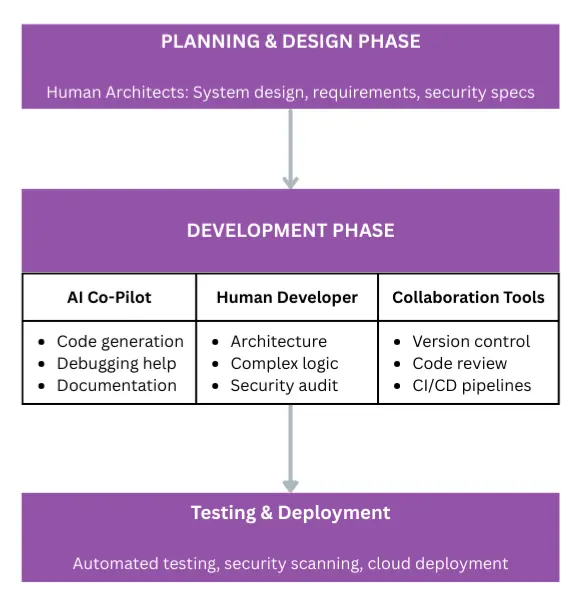
The Complete Development Lifecycle: Integrating AI and Human Expertise
Modern Web Architecture Development Workflow:
Conclusion: Forging the Future Through Symbiotic Integration
The narrative that pits basic web methods against transformative AI is false (because these two are not on different sides). NASA’s sensible approach shows that the best way forward is to work together. HTML, CSS, and JavaScript will remain the language for the front end of the web that can’t be changed and that runs all over the world. Generative AI will become an essential part of the way co-pilots create work, speed up work and make coding knowledge easier for everyone.
The Future State of Modern Web Architecture:
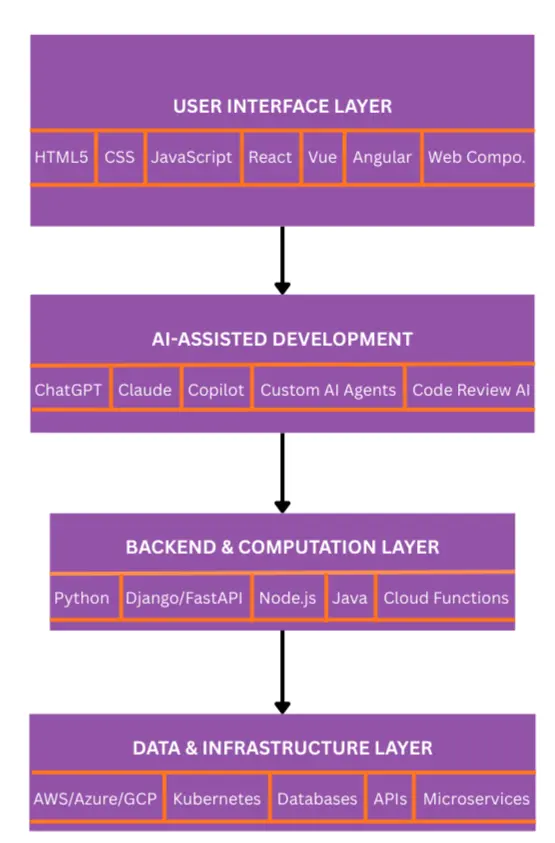
The future of new web frameworks lies in learning this way of combining things well. By understanding AI as a powerful enabler – one whose work is under the strict supervision of humans – and continuing to build on the strong foundation of old and mature technologies, we can create the hard, new, and robust digital work that will be the hallmark of the next era of the web. It’s not a matter of choosing between old and new technologies, but a sensible mix of the two that will power tomorrow’s innovations, whether on Earth or in space.
References
Academic Papers & Research
- Evaluation of ChatGPT Usability as A Code Generation Tool
https://arxiv.org/html/2402.03130v2 - Programming with ChatGPT: How far can we go?
https://www.sciencedirect.com/science/article/pii/S2666827024000021 - Assessing the Promise and Pitfalls of ChatGPT for Educational Data Mining
https://educationaldatamining.org/edm2024/proceedings/2024.EDM-long-papers.7/index.html - A Closer Look at Different Difficulty Levels Code Generation
https://zpgao.github.io/papers/A_Closer_Look_at_Code_Generation_Abilities_of_ChatGPT.pdf - Investigating Code Generation Performance of ChatGPT
https://yunhefeng.me/material/ChatGPT-Coding-CompSac-23.pdf
Technical Articles & Industry Reports
- How Accurate Is ChatGPT Coding? Insights for 2025
https://www.byteplus.com/en/topic/500276 - AI Code Generator with ChatGPT – Master HTML & CSS
https://d-libro.com/topic/using-chatgpt-as-ai-html-code-generator/ - How good is ChatGPT at delivering code?
https://www.quora.com/How-good-is-ChatGPT-at-delivering-code-In-what-programming-languages-is-it-the-best - ChatGPT vs Claude for Coding: Which AI Model is Better?
https://www.index.dev/blog/chatgpt-vs-claude-for-coding - NASA’s Thirst for Open Source Software
https://thenewstack.io/nasas-thirst-for-open-source-software-and-for-open-science/ - Python in Space: How Python is Powering Satellite Technology
https://medium.com/@danielbullescu/python-in-space-how-python-is-powering-satellite-technology-and-space-exploration-spacex-nasa-4f3d5d259888 - How does NASA use Python?
https://www.quora.com/How-does-NASA-use-Python
Framework Documentation & Comparisons
- Which Is the Best Python Web Framework: Django, Flask, FastAPI
https://blog.jetbrains.com/pycharm/2025/02/django-flask-fastapi/ - Framework to use for backend
https://www.reddit.com/r/Python/comments/lcrojlr/framework_to_use_for_backend/ - The top 4 Python backend frameworks for building entry
https://pieces.app/blog/the-top-4-python-back-end-frameworks-for-your-next-project - Flask vs Django: Let’s Choose Your Next Python Framework
https://kinsta.com/blog/flask-vs-django/ - All About Python Backends FastAPI vs Django vs Flask
https://rawheel.medium.com/all-about-python-backends-fastapi-vs-django-vs-flask-2022-c575101facb9 - Python Django or Flask for web development?
https://stackoverflow.com/questions/73838605/python-django-or-flask-for-web-development - Flask or Django: Which One Best Fits Your Python Project?
https://blog.appsignal.com/2025/06/25/flask-or-django-which-best-fits-your-python-project.html - Python Backend Frameworks Comparison With Examples
https://www.apriorit.com/dev-blog/python-backend-frameworks-comparison - Top 5 Python Frameworks (2025)
https://masteringbackend.com/posts/top-5-python-frameworks
NASA Official Documentation & Projects
- NASA’s Web Modernization
https://www.nasa.gov/wp-content/uploads/2023/03/468614-april-2020-it-talk-design-final.pdf - On Development of Modern Software Interface to Glenn Research Center
https://ntrs.nasa.gov/api/citations/20200004349/downloads/TM-2020-220513.pdf - Python Success Stories – United Space Alliance
https://www.python.org/about/success/usa/ - Digital Pipelines – A framework for Continuous Integration
https://techport.nasa.gov/projects/113175
Project Examples & Tutorials
- Single Page Application using the NASA API
https://github.com/Sonnerz/project02-interactive-frontend - Make NASA’s landing page in 50 minutes – CSS & HTML
https://dev.to/sebcodestheweb/make-nasas-landing-page-in-50-minutes-css-html-19p8 - Built a Space Explorer website with NASA API on AWS S3
https://www.linkedin.com/posts/shivam-sharma-367884283_aws-s3-cloudcomputing-activity-7359579106272800770-8Pvs - Build a Space Website w. React.JS & the NASA API
https://www.youtube.com/watch?v=5Gf6grFgoG8
Additional Resources
- Python for Web Development: Why It’s a Smart Choice
https://www.wedowebapps.com/python-for-web-development/ - What is Python Used For? Applications and Examples
https://www.98thpercentile.com/blog/what-is-python-used-for-applications - Enterprise Integration Patterns
https://www.enterpriseintegrationpatterns.com/ - Integrating Python and HTML: Solutions and Frameworks
https://www.shecodes.io/athena/2289-integrating-python-and-html-solutions-and-frameworks - Organizations Using Python
https://wiki.python.org/moin/OrganizationsUsingPython